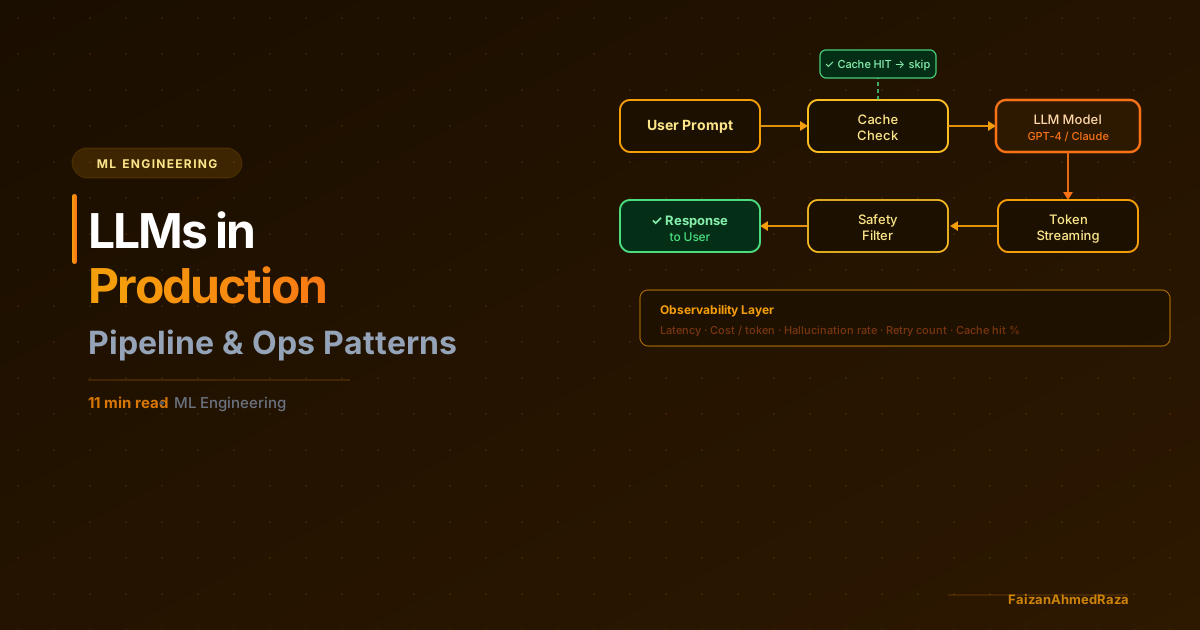
The gap between "this works in my demo" and "this works reliably for 10,000 users" is enormous in LLM applications — larger than almost any other category of software I've worked with.
I've built LLM-based pipelines at TH Nürnberg's Ohm-AI Lab and worked on enterprise AI systems in automotive engineering. Here's the production reality that blog posts and tutorials skip.
Latency Is Your First Problem
LLM inference is slow. GPT-4 can take 8–30 seconds to return a full response. For users waiting on a result, that's a long time — long enough to abandon the task, assume something broke, or form a negative impression of the product.
Streaming is not optional
For any user-facing LLM feature, you must stream the response. Show tokens as they arrive. This doesn't make the response faster, but perceived performance is dramatically better — users see immediate activity and the interface feels responsive.
In Next.js with the Vercel AI SDK:
import { streamText } from "ai";
import { openai } from "@ai-sdk/openai";

export async function POST(req: Request) {
  const { messages } = await req.json();

  const result = streamText({
    model: openai("gpt-4o"),
    messages,
  });

  return result.toDataStreamResponse();
}
On the client, useChat handles the stream. Users see output immediately.
Cache aggressively
For identical or near-identical prompts (FAQ answers, document summaries, classification results), caching LLM responses is a major latency and cost win.
I use a two-tier approach:
- Exact match cache (Redis): Hash the full prompt → cache the response for 24h. Works well for classification, FAQ systems, any deterministic use case.
- Semantic cache (Redis + embeddings): Embed the query → find cached responses with cosine similarity > 0.95. Works for conversational use cases where users ask the same thing differently.
Semantic caching with GPT Cache or a custom implementation can reduce LLM calls by 30–60% for most applications.
Prompt Engineering at Scale
Prompts that work perfectly in testing will fail in production. Real users are unpredictable.
Prompt injection is real
If your application includes user-provided content in system prompts or tools, users will try to override instructions. "Ignore all previous instructions and..." still works on many models in many configurations.
Mitigations:
- Validate and sanitize user input before including in prompts
- Use separate
usermessages (not system prompt) for user content when possible - Test adversarial inputs during development
- Monitor for anomalous outputs in production
Output format reliability
LLMs don't always follow format instructions. If you ask for JSON and receive markdown-wrapped JSON with trailing commas, your parser breaks.
Use structured output modes whenever available:
import { generateObject } from "ai";
import { z } from "zod";

const result = await generateObject({
  model: openai("gpt-4o"),
  schema: z.object({
    sentiment: z.enum(["positive", "negative", "neutral"]),
    confidence: z.number().min(0).max(1),
    key_issues: z.array(z.string()),
  }),
  prompt: `Analyze this support ticket: ${ticketContent}`,
});

// result.object is typed and validated
When structured output isn't available, always wrap parsing in try/catch and have a retry-with-modified-prompt fallback.
Prompt versioning
Treat prompts as code. Version them. Tag releases. Know exactly which prompt version produced which output.
I store prompts in a database (or at minimum, versioned files) and log prompt_version with every LLM call. When a regression appears, I can immediately identify whether a prompt change caused it.
Cost Control
LLM costs scale non-linearly with usage. A feature that costs $5/day in testing can cost $500/day in production if you didn't plan for it.
Know your cost per operation
Before shipping any LLM feature, calculate:
- Average input tokens per operation
- Average output tokens per operation
- Cost per 1M tokens for your model
- Expected operations per day
For GPT-4o at current pricing (~$2.50/1M input, $10/1M output), a feature that processes 500-token inputs and returns 200-token outputs costs roughly $0.003/operation. At 10,000 operations/day, that's $30/day — acceptable. At 100,000 operations/day, it's $300/day — plan for it.
Model routing
Not every task needs GPT-4o. A tiered approach:
- Simple classification, extraction, short Q&A: GPT-4o-mini or Claude Haiku — 10-20× cheaper
- Complex reasoning, multi-step analysis: GPT-4o or Claude Sonnet
- Long documents, large context: Gemini 1.5 Flash (cheap, huge context window)
Routing intelligently based on task complexity can reduce LLM spend by 60-80% with no quality degradation for users.
Rate limiting and abuse prevention
Without rate limits, a single bad actor (or a bug that loops) can spike your costs dramatically. Implement:
- Per-user rate limits (e.g., 20 AI requests/minute per authenticated user)
- Global circuit breakers (if spend > $X in 1 hour, alert and optionally pause)
- Unauthenticated access should never reach your LLM
Observability
You cannot debug what you cannot observe. LLM applications need observability infrastructure that goes beyond standard API logging.
What to log on every LLM call
interface LLMCallLog {
  request_id: string;
  user_id: string;
  model: string;
  prompt_version: string;
  input_tokens: number;
  output_tokens: number;
  latency_ms: number;
  cost_usd: number;
  status: "success" | "error" | "timeout";
  error_type?: string;
  // For quality monitoring:
  output_hash: string;  // detect exact duplicates
}
Evals, not vibes
Testing LLM output quality by looking at examples is not scalable. Build automated evals:
- Reference-based: Compare output to known-good answers (works for extraction, Q&A)
- LLM-as-judge: Use a second LLM to rate output quality on a rubric (works for generation tasks)
- Rule-based: Check that output satisfies structural requirements (has required fields, is the right length, uses correct terminology)
Run evals on every prompt change before shipping to production. LangSmith, Braintrust, or a custom eval pipeline — the specific tool matters less than having the discipline.
Reliability Patterns
Retry with exponential backoff
LLM APIs have rate limits and occasional errors. Always retry with backoff:
async function callWithRetry(fn: () => Promise<any>, maxAttempts = 3) {
  for (let attempt = 1; attempt <= maxAttempts; attempt++) {
    try {
      return await fn();
    } catch (error) {
      if (attempt === maxAttempts) throw error;
      if (isRateLimitError(error)) {
        await sleep(Math.pow(2, attempt) * 1000);
      } else {
        throw error; // don't retry non-rate-limit errors
      }
    }
  }
}
Fallback models
If your primary model is unavailable or returns an error, have a fallback:
async function generateWithFallback(prompt: string) {
  try {
    return await callModel("gpt-4o", prompt);
  } catch {
    console.warn("Primary model failed, falling back to gpt-4o-mini");
    return await callModel("gpt-4o-mini", prompt);
  }
}
Timeout everything
LLM calls can hang. Always set timeouts:
const result = await Promise.race([
  callLLM(prompt),
  new Promise((_, reject) =>
    setTimeout(() => reject(new Error("LLM timeout")), 30_000)
  ),
]);
From My Own Projects
At TH Nürnberg's Ohm-AI Lab (Feb–Jul 2025) I built a pipeline that infers fitness activity, calorie and heart-health metrics from app screenshots (Adidas and Samsung Health). It combines Vision LLMs, YOLO-family detectors, OCR and PyTorch, and reached 92% extraction accuracy across very different screenshot layouts.
The LLM was one stage in that pipeline, not the whole system. OCR and layout detection handled what they are good at, and the output only became reliable after dedicated pre- and post-processing and handling for missing information. That is why I design the pipeline around the model rather than hoping one prompt covers every case.
The Operational Mindset
The biggest shift from standard software engineering to LLM application engineering is accepting that the system is probabilistic, not deterministic. The same input can produce different outputs. Quality degrades in ways that aren't immediately visible. Models change with provider updates.
This requires a different operational approach:
- Monitor output quality continuously, not just availability
- Budget for ongoing prompt engineering as a recurring cost
- Version and test prompts like you version and test code
- Accept that "good enough" quality, reliably delivered, beats "perfect" quality that's brittle
If you're taking an LLM feature to production and want to build it right from the start, get in touch.